


Guys, use Whisper if you can, translating using my arcaic method is like trying to play piano with knife and fork.



Whisper just seems to die on me like almost immediately after I load the audio file. Does it work with all audio files or does it just crash with some of them? I could always try some other videos.
Should handle pretty much any audio file type, pretty sure it install ffmpeg as a dependency to deal with that. Without an error message, it's impossible to say what the problem actually is, but a likely cause would be that you're using a model too big for your GPU VRAM or you don't have an nvidia gpu or you're using the wrong cuda version for your gpu.
Edit: I checked and it does indeed install a python version of ffmpeg so except maybe some super rare audio formats, it'll be able to use anything as long as it's not corrupt.
whisper "audio_or_video_file.whatever" --language Japanese --task translate --model mediumThe RTX 2070 "only" has 8GB of VRAM so the large model wouldn't work with it since it requires 10, but any other model will be ok and the cuda version should be fine although I can't find out the exact requirement for whisper.
I have no clue how the web based version works, but it likely hides the output error if there's one so that makes figuring the issue a lot harder. If you can also call whisper from the command line, you should give that a try to see if you get a more descriptive error message, assuming you weren't using the large model before.
In command line, you just navigate to where your audio/video is(or specify the full path of the audio in the command) and type something like this to get it working:
Code:whisper "audio_or_video_file.whatever" --language Japanese --task translate --model medium
Ok, so it's not running it on your own pc but it the colab thing? If so, your gpu is irrelevant, unless you followed what Epinwinrar posted to install the webUI locally, in which case do what I suggested in my previous post to test it.
It tells you it failed for some reason but doesn't say why so unless there's a log somewhere else with more information, there's no way to tell what the issue is.
NameError Traceback (most recent call last)
<ipython-input-4-8dadf0f27685> in <module>
56 try:
---> 57 audio_path = uploaded_file
58 if not os.path.exists(audio_path):
NameError: name 'uploaded_file' is not defined
During handling of the above exception, another exception occurred:
ValueError Traceback (most recent call last)
<ipython-input-4-8dadf0f27685> in <module>
59 raise ValueError("Input audio not found. Is your audio_path correct?")
60 except NameError:
---> 61 raise ValueError("Input audio not found. Did you upload a file?")
62
63 out_path = os.path.splitext(audio_path)[0] + ".srt"
ValueError: Input audio not found. Did you upload a file?

 colab.research.google.com
Sorry, I had missed it, but it does describe the error more fully below. That last line is telling me that it couldn't find my audio file. Not sure what to do to make it find the file. I followed the instructions for how to upload it. It pops up in a second window and plays.
You can try it yourself here:
Google Colab
Takes about 2 minutes to get it started. See what happens.
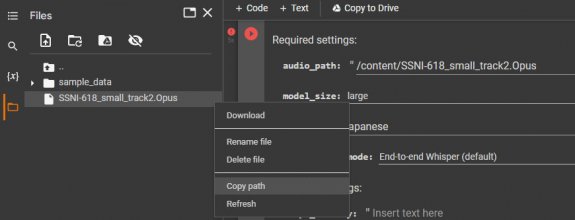
You probably didn't copy the path properly. If you upload to the colab, it should be like this:
View attachment 3127558
Click the 3 dots you see when you hover over the file, copy path and then paste in the input.
Doesn't seem very happy with an opus file for some reason(ffmpeg 100% support it) or I did something wrong but I'm not getting an input error.
Edit: Because I improperly demuxed it and it's a garbage file that doesn't work so that explains that.


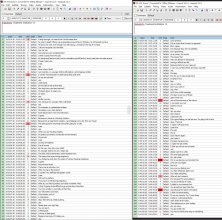

However, because the models are trained in a weakly supervised manner using large-scale noisy data, the predictions may include texts that are not actually spoken in the audio input (i.e. hallucination). We hypothesize that this happens because, given their general knowledge of language, the models combine trying to predict the next word in audio with trying to transcribe the audio itself.