

what are your settings at whisperjav to get results (no cloud). Whisperjav V1.8.14 produces either 0 bit files after successfully completing or errors midway. I do have 16gb of memory and RTX 5080 graphic card. Super annoying.
Post your JAV subtitle files here - JAV Subtitle Repository (JSP)★NOT A SUB REQUEST THREAD★
- Thread starter Eastboyza
- Start date
-
Akiba-Online is sponsored by FileJoker.
FileJoker is a required filehost for all new posts and content replies in the Direct Downloads subforums.
Failure to include FileJoker links for Direct Download posts will result in deletion of your posts or worse.
For more information see this thread.

You are using an out of date browser. It may not display this or other websites correctly.
You should upgrade or use an alternative browser.
You should upgrade or use an alternative browser.
Does it also take a long time to process?
Can you do the following steps:
Can you do the following steps:
- Set the debug flag (you can set it on Adv. Options TAB)
- Run the same movie / setup that creates problem again
- Copy the console output and send me the log. You can do ctrl+a n ctrl+c to copy the console content.
- If the tyranscription is taking too long, you can cancel after a couple of scenes have finished.
Last edited:

You can do strl+a n ctrl+v to copy the console content.
You probably mean ctrl+a(select all) and ctrl+c(copy) since ctrl+v is paste(which they would need to do once they message you). Unless you're overriding the default shortcuts.

You probably mean ctrl+a(select all) and ctrl+c(copy) since ctrl+v is paste(which they would need to do once they message you). Unless you're overriding the default shortcuts.
thanks for catching it!
I've now edited the original message to correct it.
what are your settings at whisperjav to get results (no cloud). Whisperjav V1.8.14 produces either 0 bit files after successfully completing or errors midway. I do have 16gb of memory and RTX 5080 graphic card. Super annoying.
I am not able to reproduce the same (bad) results in my environment. I suspect the issue is dependent on the environment.
I suspect that somehow the compute type (pf16 vs int8) is mismatched with the Blackwell GPU (probably a regression of an older issue).
To diagnose that, here is a diagnostic script to get more environment information. Would you run the diagnostics inside your whisperjav installation folder and send me the output file.
attached asr_diag.zip
---
The zip file includes a diag script and a diag audio file.
1. Unzip the files into your WhisperJAV installation folder
Inside it you’ll find:
asr_diag.py (the diagnostics script)
asr_diag_audio.wav (a short test audio file)
Extract both files directly into the folder where WhisperJAV is installed.
That’s the folder that contains python.exe, whisperjav.exe, and similar files.
(If you’re unsure, right‑click the WhisperJAV shortcut, select “Open file location”, and use that folder.)
2. Open a terminal in that folder
3. Run the diagnostics script
In the terminal, type the following command:
```
.\python.exe asr_diag_v13.py --audio asr_diag_audio.wav --model large-v2 --device cuda
```
The script will now run. It will print on screen as well as it saves an output file in an output folder.
The test will take about 2–3 minutes. During that time you may see messages like “Loading model…” and “Benchmark…”.
4. Wait for completion
When the script is ends, in your WhisperJAV installation folder, you will now have a new subfolder called asr_diag_output.
The script saves the results in that folder.
5. Send me the results (jso log) please.
Attachments

ABF-153 Absolutely Loyal Secretary Umi Yahagi

As always...
... I don't speak nor read Japanese so there are certain to be lots of mistakes.
It'd be extra-shiny if mistakes could be pointed out or corrected.
- Code: ABF-153
- Release date: 2024-10-04
- Director: Michiru San
- Studio: Prestige
- Label: ABF
- Tags: 3P, AV Actress, Cosplay, Shaved, Slender, Solowork
- Series: Totally Loyal Secretary
- Actor: Giant Hirota, Hideyuki Setune, Samejima, Wolf Tanaka
- Actress: Yatsugake Umi
As always...
... I don't speak nor read Japanese so there are certain to be lots of mistakes.
It'd be extra-shiny if mistakes could be pointed out or corrected.
Attachments

UMD-635 I Lost My Virginity To My Aunt Mother. Number 6 UD-814R

I couldn't resist subbing this JAV starring two of my favorite MILFs. I "restored" this movie by reducing the mosaics and attempted to return the storyline to the original one before the Studio censors neutered it!
I couldn't resist subbing this JAV starring two of my favorite MILFs. I "restored" this movie by reducing the mosaics and attempted to return the storyline to the original one before the Studio censors neutered it! 
I used WhisperJAV0.7 to create the Sub and edited it to fill in missing dialog and to provide better clarification at several places. I also cleaned it up a bit, re-interpreted some of the meaningless/ "lewd-less" dialog, and re-formatted some of the dialog. Again, I don't understand Japanese so my re-interpretations might not be totally accurate but I try to match what is happening in the scene. Anyway, enjoy and let me know what you think.
Attachments


Apple just announced an upcoming feature that may signal the beginning of the end of our thread: Subtitles for Video 
Add to that the fact the Apple already has Translation App
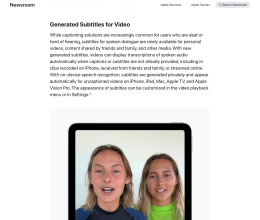
Add to that the fact the Apple already has Translation App

Thanks for the report Pendekar25. I have been waiting for this kind of technology for a long time. I know that VLC had been promising it for a while. My understanding is that 2 factors have been holding things up in our little neck of the woods. Japanese has a complicated structure that defies conventional language dynamics and the content itself is not typically in the 'must get right' realm and so 'swallowing cum' is not high on the priority list of things to get translated, especially when non-porn videos could contain, for example, 'gee mom, I think that I'll go and eat some ramen'. In my post-processing script that would get translated to 'gee mom, I think that I'll go and eat some cum'. That's the problem , or one of them, the Auto translator would have to have a specific 'JAV' option rather than a one size fits all.Apple just announced an upcoming feature that may signal the beginning of the end of our thread: Subtitles for Video
Add to that the fact the Apple already has Translation App
View attachment 3809362
That said, I would be thrilled to see this technology. On-the-fly translation, without hallucination, would be a huge gift.
Please keep us updated if there is any news. Cheers.
There will always be a place for subtitle files since there are many problems with generating them on-the-fly, even if only because it is very demanding on hardware and push up electricity cost if you do it every time instead of once.
Yes, that's a good point about the demands of the hardware. I am spoiled with my hardware, but not everyone has the cash to shell out $5000.00+ CAD for a 5090 etc. Personally, as I said, there would have to be a JAV-specific technology, maybe the good folks who created Ladaap may have a go.There will always be a place for subtitle files since there are many problems with generating them on-the-fly, even if only because it is very demanding on hardware and push up electricity cost if you do it every time instead of once.
RCTD-738 Brainwashed Family II ~When I Used The Forbidden Incest Ray Gun, My Grandmother, Mother, And Sister All Became My Puppets~

I had to Sub this JAV just to see what the storyline was about. Still not sure who the "puppet" was however; from the wellingness of the female relatives, it might really have been the son!
I used WhisperJAV0.7 to create the Sub and edited it to fill in missing dialog and to provide better clarification at several places. I also cleaned it up a bit, re-interpreted some of the meaningless/ "lewd-less" dialog, and re-formatted some of the dialog. Again, I don't understand Japanese so my re-interpretations might not be totally accurate but I try to match what is happening in the scene. Anyway, enjoy and let me know what you think.
Attachments
DASS-968 After Showering My Mother With Love Every Day For A Month, She Lost All Self-control, And We Had Sex Over And Over Again To Try And Conceive A Cd. – Reika Natsume

I couldn't resist Subbing this mother-son themed JAV that had a happy ending! I used WhisperJAV0.7 to create the Sub and edited it to fill in missing dialog and to provide better clarification at several places. I also cleaned it up a bit, re-interpreted some of the meaningless/ "lewd-less" dialog, and re-formatted some of the dialog. Again, I don't understand Japanese so my re-interpretations might not be totally accurate but I try to match what is happening in the scene. Anyway, enjoy and let me know what you think.
Attachments
Thanks @Chuckie100DASS-968 After Showering My Mother With Love Every Day For A Month, She Lost All Self-control, And We Had Sex Over And Over Again To Try And Conceive A Cd. – Reika Natsume
View attachment 3810438
I couldn't resist Subbing this mother-son themed JAV that had a happy ending! I used WhisperJAV0.7 to create the Sub and edited it to fill in missing dialog and to provide better clarification at several places. I also cleaned it up a bit, re-interpreted some of the meaningless/ "lewd-less" dialog, and re-formatted some of the dialog. Again, I don't understand Japanese so my re-interpretations might not be totally accurate but I try to match what is happening in the scene. Anyway, enjoy and let me know what you think.
I have loved the "After showering my mother with love every day for a month" series from jump street!
The scene from the OG (DASS-115) where the son decides to flirt with Mom by flashing his Mom after a shower while playing it cool was an instant classic.
I look forward to watching this one asap.
Cheers
Attachments


[Reducing Mosaic]SCOP-817 My Newlywed Sister, Worried That Her Husband Would Hate Her If She Was Bad At Sex, Begged Me To Let Her Practice Cowgirl Position On Me. I Got So Excited By Her Bouncing Breasts That I Started Thrusting Rapidly From Below, And She Came Like Crazy.

I couldn't resist Subbing this sibling themed JAV because of the collection of hot "sisters"! I used WhisperJAV0.7 to create the Sub and edited it to fill in missing dialog and to provide better clarification at several places. I also cleaned it up a bit, re-interpreted some of the meaningless/ "lewd-less" dialog, and re-formatted some of the dialog. Again, I don't understand Japanese so my re-interpretations might not be totally accurate but I try to match what is happening in the scene. Anyway, enjoy and let me know what you think.
Attachments
ABF-164 There's A Limit To Being A NEET Princess! Unemployed, Nerdy, And Sexually Frustrated, This Dried-fish Beauty Has Remembered The Pleasure Of A Dick! Umi Yahagi

As always...
... I don't speak nor read Japanese so there are certain to be lots of mistakes.
It'd be extra-shiny if mistakes could be pointed out or corrected.
- Code: ABF-164
- Release date: 2024-11-01
- Director: Michiru San
- Studio: Prestige
- Label: ABF
- Tags: AV Actress, Cosplay, Masturbation, Shaved, Slender, Solowork
- Series: There's a limit to how much of a NEET princess you can be!
- Actor: Hideyuki Setune, Jun Odagiri
- Actress: Yatsugake Umi
As always...
... I don't speak nor read Japanese so there are certain to be lots of mistakes.
It'd be extra-shiny if mistakes could be pointed out or corrected.
Attachments
Agree 100%! I also love this series too! DASS-115 is a classic! Thanks Chuckie!Thanks @Chuckie100
I have loved the "After showering my mother with love every day for a month" series from jump street!
The scene from the OG (DASS-115) where the son decides to flirt with Mom by flashing his Mom after a shower while playing it cool was an instant classic.
I look forward to watching this one asap.
Cheers
Similar threads
- Replies
- 78
- Views
- 66K

- Sticky
- Replies
- 2K
- Views
- 2M

- Replies
- 188
- Views
- 42K

- Replies
- 42
- Views
- 10K
- Replies
- 485
- Views
- 487K