


I didn't want to hijack our friend's thread linked above and send readers here during "production", so I think it was best to complete the project and thread where I did, but, this should be the home for the process, I suppose.
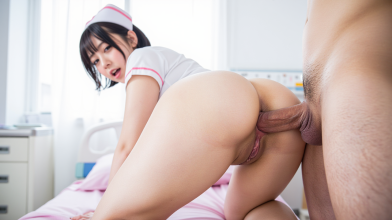
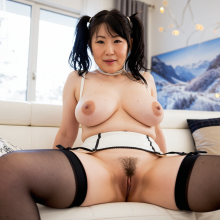
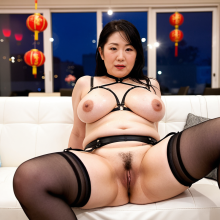
TL;DR - If you check out the linked post above you'll see I thought I'd try my hand at at least something JAV related when @nomoremrniceguy posted the reply "Give it a try and show us what you came up with, I'm interested!" Truth be told, a day or two into the project I thought he was probably talking to the OP and not me, but I went with it. Had to come up with a simple/standard JAV genre. Nurses! Long story short, I created source images, made some title cards, found some free music and created the trailer with Z-Image Turbo, Wan 2.2, some Loras, video utilities (not editing software) and ComfyUi.
The Shot List
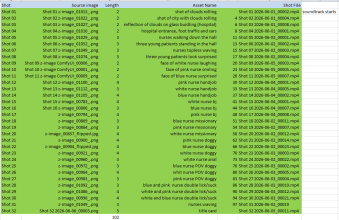
What I did was remember and re-watch a number of JAV trailers on Fanza. I got a feel for how long the scenes were before a cut, and there are a lot of cuts! I didn't want to go that route so I figured 2-5 second clips but tried to stay more at 3-4 seconds. I first found the soundtrack I liked (free after searching for "free Japanese pop music") and then started listing out from start to finish what I wanted to see. I wanted it to seem like a JAV title as well as trailer since that was the original ask, so I started with a familiar opening to many titles...clouds and a city scene, then made my way through the introduction of the premise having the title in mind and using the characters interacting in the hallway, then straight to the action scenes.
I thought of simple actions in the interest of time, didn't really try to refine anything. I named them all to keep track (assets). The prompts were quite simple, really. Attached are the corresponding prompts for Z-Image Turbo and Wan 2.2 videos. You'll see the length of each clip I was proposing in the tracking list image. I had to include enough shots and varied their length to equal the total runtime of the soundtrack, so that drove the breakdown. I started every shot as 5 seconds then randomly pared things down across all of them to arrive at the original soundtrack's runtime. But then the whole length fiasco I talked about in the thread, so I found another actually better soundtrack that fit the fun mood nicely.
The Image Generation
I generated approximate 190 images from start to finish with the attached prompts. There were plenty with mistakes, not what I thought would translate to video as good as others, and outfits that weren't the right color for at least some consistency if I wasn't shooting for character consistency. It makes a difference if a woman's face is closer or nearer to the man's penis. Too far away and the video generation will have her go for it well into the length selected. If she was closer the model would be able to get her to act quicker. Just compare Shot 17 to 15 and 16. Shot 17 her face is far away, so the model slowly brought her down to him. Sure, it ended up being a great slow shot, but 15 and 16 the starlet went right to it.
Z-Image Turbo likes to produce image from the left to right. Maybe they do, but for Shots 20 and 22 I decided to horizontally flip the original output to give some variance, otherwise it looked too artificial (ironically). Surely a real director wouldn't always shoot the exact same placement for a non-niche title, like a blowjob title that just had POV shots throughout.
Each image was generated at 1280x720 with the intent to have the video generate at 1024x576. I did upscale the image for Shot 07 so I could crop each actress centered in their own frame. I had to create another ComfyUI workflow to mask/remove hands and half faces, though. I did this based on the instructions on a YouTube video named:
"2025 ComfyUI Remove any object you want。step by step Tutorial , You Can Definitely Learn 。"
The Video Generation
I generated 90 or so videos based on the shot list with the attached prompts. I assumed when I set a video for 2 seconds in length that's what I'd get, but it ended up being 2.x seconds, so by the time all my shots were done it was no longer totaling the exact runtime I had calculated, so I had to find another soundtrack. What I had decided was to find a tune that was close to a 2 minute runtime and then piece together the shots that would equal that runtime.
There were plenty of videos left on the cutting room floor. Some with bad anatomy once movement started and the model decided to bring in some interesting body parts, some of the actress not doing much or doing too little of what I wanted, OR acting like they didn't know what they were doing haha! (insert me reviewing clips thinking THAT's NOT how you suck a cock! )
)
Since these generations take way longer than images, this is where the bulk of the time was spent. Set the prompts, let it generate 2-4 clips at a time, rinse and repeat. As I went along I would decide on the winning shot to add to the final shot list. If you noticed on the updates I didn't do it linear, i would skip around to the shots that were either short to get them done quickly or shots where I knew Wan would get things right relatively quickly since I've had my experience with it
Before long all the shots where done, just had to merge and mux to create the final video.
Editing without Editing Software
My plan was simple but ended up not too simple. Get a soundtrack of x length. Generate video clips that when combined would equal that same length, then use MKVMerge to combine all the clips together and include the soundtrack as the audio for the output. What could be more simple?
It didn't work. I had placed a delay for the audio before muxing the same length as the begining title card shot so that the soundtrack would start when the clouds started rolling by, but as I watched the video play after muxing was done the audio faded out TWELVE SECONDS before the video stopped. That's when it hit me about the 2.x, 3.x, 4.x second generations I hadn't anticipated. Increasing the delay was out of the question, then we'd have 12 seconds of silence at the begining. So I had to find the other soundtrack.
After solving that, I had to demux the created MKV to video/audio streams and use Yamb to mux back to MP4. (I know...I know...but I'd much rather use MKVMerge GUI to combine things, just easier for me.) Then I had another one or two views since it was just fun, and uploaded to MEGA so I could present it. PROBLEM! When I watched it in the browser the delay was missing so the soundrack stated as soon as the title card hit the screen. Good grief. After some research, it seemed it was just going to do that, the browser was not going to honor the delay easily or at all. So...
I found an mp3 of silence on the web, cut it to the length of the title card duration, then concatentated that to the front of the soundtrack mp3. I'm embarassed to say I had to use Google to figure that one out. I did the whole MKVMerge to Yamb process with the corrected audio and at last it was done and I was able to share it.
Conclusion
All in all the first images were created on 5/24, so it was 13 days from start to finish as I had time to work on it. It was definitely fun. Nowadays they have (arguably) better technology to use like LTX, lip sync, extended "unlimited" length videos, so it should be possible to make much longer shots/scenes. Theoretically one could create a 10-30 minute feature, if not longer, using better images and more refined and directional prompts if the model can adhere to what it is being asked to produce. At this point it is up to the imagination on the creation side and on the viewing side as to what constitutes a JAV feature and experience.
Tools used
Workflow:
ComfyUI
Image Model:
moodyProMix_zitV12DPO.safetensors (https://civitai.red/models/620406/moody-pro-mix)
Image Loras (one some images):
PornMaster_NSFW_ZIT_V1.safetensors (https://civitai.red/models/2608450/pornmaster-nsfw-z-image)
Video Model:
Wan2.2-I2V-A14B-HighNoise-Q4_K_M.gguf
Wan2.2-I2V-A14B-LowNoise-Q4_K_M.gguf
* replaced WanImageToVideo with PainterI2V in workflow
Video Loras:
Wan2_2_Lightning_high_noise_model.safetensors
Wan2_2_Lightning_low_noise_model.safetensors
DR34ML4Y_I2V_14B_HIGH_V2.safetensors (https://civitai.red/models/1811313/dr34ml4y-all-in-one-nsfw-wanltx2?modelVersionId=2553151)
DR34ML4Y_I2V_14B_LOW_V2.safetensors (https://civitai.red/models/1811313/dr34ml4y-all-in-one-nsfw-wanltx2?modelVersionId=2553271)
TL;DR - If you check out the linked post above you'll see I thought I'd try my hand at at least something JAV related when @nomoremrniceguy posted the reply "Give it a try and show us what you came up with, I'm interested!" Truth be told, a day or two into the project I thought he was probably talking to the OP and not me, but I went with it. Had to come up with a simple/standard JAV genre. Nurses! Long story short, I created source images, made some title cards, found some free music and created the trailer with Z-Image Turbo, Wan 2.2, some Loras, video utilities (not editing software) and ComfyUi.
The Shot List
What I did was remember and re-watch a number of JAV trailers on Fanza. I got a feel for how long the scenes were before a cut, and there are a lot of cuts! I didn't want to go that route so I figured 2-5 second clips but tried to stay more at 3-4 seconds. I first found the soundtrack I liked (free after searching for "free Japanese pop music") and then started listing out from start to finish what I wanted to see. I wanted it to seem like a JAV title as well as trailer since that was the original ask, so I started with a familiar opening to many titles...clouds and a city scene, then made my way through the introduction of the premise having the title in mind and using the characters interacting in the hallway, then straight to the action scenes.
I thought of simple actions in the interest of time, didn't really try to refine anything. I named them all to keep track (assets). The prompts were quite simple, really. Attached are the corresponding prompts for Z-Image Turbo and Wan 2.2 videos. You'll see the length of each clip I was proposing in the tracking list image. I had to include enough shots and varied their length to equal the total runtime of the soundtrack, so that drove the breakdown. I started every shot as 5 seconds then randomly pared things down across all of them to arrive at the original soundtrack's runtime. But then the whole length fiasco I talked about in the thread, so I found another actually better soundtrack that fit the fun mood nicely.
The Image Generation
I generated approximate 190 images from start to finish with the attached prompts. There were plenty with mistakes, not what I thought would translate to video as good as others, and outfits that weren't the right color for at least some consistency if I wasn't shooting for character consistency. It makes a difference if a woman's face is closer or nearer to the man's penis. Too far away and the video generation will have her go for it well into the length selected. If she was closer the model would be able to get her to act quicker. Just compare Shot 17 to 15 and 16. Shot 17 her face is far away, so the model slowly brought her down to him. Sure, it ended up being a great slow shot, but 15 and 16 the starlet went right to it.
Z-Image Turbo likes to produce image from the left to right. Maybe they do, but for Shots 20 and 22 I decided to horizontally flip the original output to give some variance, otherwise it looked too artificial (ironically). Surely a real director wouldn't always shoot the exact same placement for a non-niche title, like a blowjob title that just had POV shots throughout.
Each image was generated at 1280x720 with the intent to have the video generate at 1024x576. I did upscale the image for Shot 07 so I could crop each actress centered in their own frame. I had to create another ComfyUI workflow to mask/remove hands and half faces, though. I did this based on the instructions on a YouTube video named:
"2025 ComfyUI Remove any object you want。step by step Tutorial , You Can Definitely Learn 。"
The Video Generation
I generated 90 or so videos based on the shot list with the attached prompts. I assumed when I set a video for 2 seconds in length that's what I'd get, but it ended up being 2.x seconds, so by the time all my shots were done it was no longer totaling the exact runtime I had calculated, so I had to find another soundtrack. What I had decided was to find a tune that was close to a 2 minute runtime and then piece together the shots that would equal that runtime.
There were plenty of videos left on the cutting room floor. Some with bad anatomy once movement started and the model decided to bring in some interesting body parts, some of the actress not doing much or doing too little of what I wanted, OR acting like they didn't know what they were doing haha! (insert me reviewing clips thinking THAT's NOT how you suck a cock!
)Since these generations take way longer than images, this is where the bulk of the time was spent. Set the prompts, let it generate 2-4 clips at a time, rinse and repeat. As I went along I would decide on the winning shot to add to the final shot list. If you noticed on the updates I didn't do it linear, i would skip around to the shots that were either short to get them done quickly or shots where I knew Wan would get things right relatively quickly since I've had my experience with it
Before long all the shots where done, just had to merge and mux to create the final video.
Editing without Editing Software
My plan was simple but ended up not too simple. Get a soundtrack of x length. Generate video clips that when combined would equal that same length, then use MKVMerge to combine all the clips together and include the soundtrack as the audio for the output. What could be more simple?
It didn't work. I had placed a delay for the audio before muxing the same length as the begining title card shot so that the soundtrack would start when the clouds started rolling by, but as I watched the video play after muxing was done the audio faded out TWELVE SECONDS before the video stopped. That's when it hit me about the 2.x, 3.x, 4.x second generations I hadn't anticipated. Increasing the delay was out of the question, then we'd have 12 seconds of silence at the begining. So I had to find the other soundtrack.
After solving that, I had to demux the created MKV to video/audio streams and use Yamb to mux back to MP4. (I know...I know...but I'd much rather use MKVMerge GUI to combine things, just easier for me.) Then I had another one or two views since it was just fun, and uploaded to MEGA so I could present it. PROBLEM! When I watched it in the browser the delay was missing so the soundrack stated as soon as the title card hit the screen. Good grief. After some research, it seemed it was just going to do that, the browser was not going to honor the delay easily or at all. So...
I found an mp3 of silence on the web, cut it to the length of the title card duration, then concatentated that to the front of the soundtrack mp3. I'm embarassed to say I had to use Google to figure that one out. I did the whole MKVMerge to Yamb process with the corrected audio and at last it was done and I was able to share it.
Conclusion
All in all the first images were created on 5/24, so it was 13 days from start to finish as I had time to work on it. It was definitely fun. Nowadays they have (arguably) better technology to use like LTX, lip sync, extended "unlimited" length videos, so it should be possible to make much longer shots/scenes. Theoretically one could create a 10-30 minute feature, if not longer, using better images and more refined and directional prompts if the model can adhere to what it is being asked to produce. At this point it is up to the imagination on the creation side and on the viewing side as to what constitutes a JAV feature and experience.
Tools used
Workflow:
ComfyUI
Image Model:
moodyProMix_zitV12DPO.safetensors (https://civitai.red/models/620406/moody-pro-mix)
Image Loras (one some images):
PornMaster_NSFW_ZIT_V1.safetensors (https://civitai.red/models/2608450/pornmaster-nsfw-z-image)
Video Model:
Wan2.2-I2V-A14B-HighNoise-Q4_K_M.gguf
Wan2.2-I2V-A14B-LowNoise-Q4_K_M.gguf
* replaced WanImageToVideo with PainterI2V in workflow
Video Loras:
Wan2_2_Lightning_high_noise_model.safetensors
Wan2_2_Lightning_low_noise_model.safetensors
DR34ML4Y_I2V_14B_HIGH_V2.safetensors (https://civitai.red/models/1811313/dr34ml4y-all-in-one-nsfw-wanltx2?modelVersionId=2553151)
DR34ML4Y_I2V_14B_LOW_V2.safetensors (https://civitai.red/models/1811313/dr34ml4y-all-in-one-nsfw-wanltx2?modelVersionId=2553271)