how to fix audio out of sync

lacus889

New Member
Jan 12, 2025
27
1
3
35
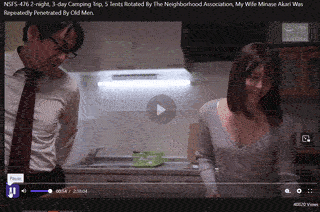
i was watching NSFS-476 and after the first minute the audio is out of sync for maybe around 2-3 second delay, how to fix it permanently?
 
You are not describing exactly - were you watching STREAMING video on web page - or a saved video inside your PC.

If the video is streaming with audio out of sync, there is nothing you can do.
It is the problem of streaming page.
If the video is downloaded, in your PC and the audio is out of sync, you could fix it with the video editing tool avidemux.

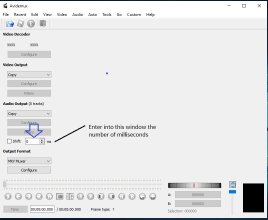
In avidemux there is under the Audio Output available the option > Shift > mark this in small window on the left
and in the bigger window, you just try to enter the right number of milliseconds, (3 seconds is 3000 ms).


avidemux audio shift.jpg
 
Last edited:
Very true, @aronora !! I just watched it on supjav.com, the Streamtape version, and it had perfect audio throughout!

A ripped title from a streaming site can be fixed as well, the easiest way I've found is using mkvmerge.
 
More about audio sync, using avidemux, AI for help :) -

*******************************************

Steps to Sync Audio with Avidemux

Initial Setup

Open Avidemux: Launch the Avidemux application on your computer.
Load Your Video File: Go to File > Open and select the video file you want to edit.

Adjust Audio Settings

Enable Shift Option: In the Audio output settings, check the box for the "Shift" option. This allows you to adjust the audio timing.
Set Video and Audio Output: Ensure that both Video output and Audio output are set to "Copy". This prevents re-encoding and maintains the original quality.

Determine Sync Adjustment

Test Playback: Play the video and observe the sync between audio and video.

Adjust Timing:

If the audio is ahead of the video, enter a positive value (e.g., 200 ms) in the Shift box to delay the audio.

If the audio is behind the video, enter a negative value (e.g., -200 ms) to advance the audio.

Save Your Changes

Save the Edited Video: Once you are satisfied with the sync, go to File > Save > Save Video... or press Ctrl+S. Choose a name and location for your file.

Tips for Accurate Sync

Start with small adjustments (around 200 ms) and test playback after each change.
Use visual cues in the video, like claps or other sounds, to help determine the correct sync value.
By following these steps, you can effectively sync audio with your video using Avidemux.


:) :)
 
Where did you get it? It's likely (hopefully!) just a difference in the framerate.
i got it from javx357.com

You are not describing exactly - were you watching STREAMING video on web page - or a saved video inside your PC.

If the video is streaming with audio out of sync, there is nothing you can do.
It is the problem of streaming page.
If the video is downloaded, in your PC and the audio is out of sync, you could fix it with the video editing tool avidemux.

In avidemux there is under the Audio Output available the option > Shift > mark this in small window on the left
and in the bigger window, you just try to enter the right number of milliseconds, (3 seconds is 3000 ms).


View attachment 3806683
sorry for not being clear, the video is on my pc

i just found the problem with the video i downloaded. the video probably corrupted or something, there's 4 second of frames that got skipped.
ill try download from different source to see if there's any different

Stream tape version
Normal.gif

My downloaded video

Glitcy.gif
 
  • Love
Reactions: Casshern2
You better try more solid sources for download.
I usually check my approved sources - like 7mmtv.sx.
here you have 5-6 different sources (in buttons down the video window)
Some of them are 720p.

Here, on page javsiri.cc is the same movie available with reduced mosaic, up to video quality 1080p.
(options - 480p, 720p, 1080p) and - audio is in sync!
Here the video is streaming in .MP4 format and for download from this site could be used
Chrome extension Douga Getter >

Downloaded movie file 1080p .MP4 > size about 2,3 GB.


Correct Title > NSFS-476 - Akari Minase - 2-Night, 3-Day Camping Trip: Neighborhood Association Tent Trip 5 - My Wife Was Repeatedly Cummed Inside by Old Men

:) :)
 
Last edited:
apparently all the downloadable source have the same issue, so i just fix it with Avidemux and now everything is good.
but i dont understand why it can happen, the video come from the same source, but one is glitched and the other is not. anyway thanks for the help
 
Downloading it from a streaming site redoes the container, which is what holds the sync data, so that gets lost.
It's not an issue when the audio is perfectly synced in the first place, but that's not always the case.