

DE-censoring JAV with Free Open source LADA application

avatarthe

Well-Known Member
Feb 1, 2008
185
291
63
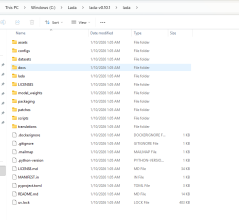
I don't know how I missed this before but one of the best uses for AI has been created, LADA!
LADA is a free open source program that will de-censore JAV , either in realtime (as you watch it) or convert the movie file. All this and it works way better that JAVPlayer.
I was even able to convert some old JAV VCDs NEAR VHS quality) and remove the mosaic!


Look at this side by side sample
9A5phAG.gifTDxYkJn(6).gif
 
Last edited:
Great find. It's a shame I'm terrible with encoding stuff aside from ripping phyiscal discs. This is almost revolutionary.

Hope all releases with be A.I re-encoded and uncensored
 
Censored jav is a crime against humanity :mad: There's a lot of bad that come with AI, but it gives me hope that at least we can enjoy these things soon. I love seeing people take things into their own hands
 
Censored jav is a crime against humanity :mad: There's a lot of bad that come with AI, but it gives me hope that at least we can enjoy these things soon. I love seeing people take things into their own hands

JAV movies, produced for sales in Japan at Japanese porn makers/studios must be all censored
/with mosaic on genitals/, according to strict Japanese Law, Article 175 of Japanese
Criminal Code,
which makes illegal to publish or sell uncensored porn content in Japan,
with exposed genitals. Therefore in all adult videos, movies, pictures, manga etc.
genitals must be censored /pixelated/.


Japanese makers/studios make porn movies mainly for Japanese own customers,
which could easily be tens of millions, mostly men. And - following latest developments
in decreasing/closing free access to interested people from whole world to Japanese big
portals like FANZA, DMM.com, SOKMIL.com - shows - they are not interested about
foreigners free/paid access to Japanese censored porn movies at all.


Surprizingly, Japanese Adult /porn/ Movies, being censored, are very competitive amongst
porn consumers in whole world.

About uncensored videos - with Japanese women starring, without any censorship.

Videos, produced in abroad studios, registered elsewhere out of Japan (which are non-Japanese makers) -
(p.e. Caribbeancom, pacopacomama, 1Pondo, HEYZO and others) - are uncensored.

However, those uncensored videos, as produced items (DVD), could not be officially sold
in Japan in porn shops
, (customers could download them only as original video files via online
payment
to those non-Japanese makers/studios).

Women, performing in uncensored videos at those abroad registered makers,
are paid much less than JAV Idols in JAV censored movies.
 
yes just stumbled upon it in github and installed it a few minutes ago. No headache, the whole python env is built in. I checked in here as soon as I saw the amazing preview, to see if anyone was talking about it. Looks like it's the only entry. The preview was better than anything uncensored I've seen before, and I threw in a mega wide pixelated movie. Processing my first movie right now
 
  • Like
Reactions: Zhonda
I'm very excited about this! I did my first movie, HUNBL-133, and the results were great. I plan to go into some older favorites and can't wait to see the results.
 
  • Like
Reactions: Zhonda
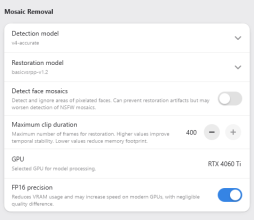
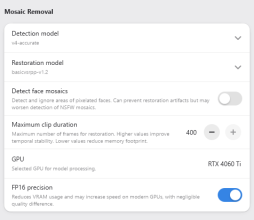
In his video tutorial, he boosts params to 400 frames continuity with the accurate model. That's how I got the best results. It doesn't eat up much VRAM.
I've converted a few movies I never could find in RM version... mind blowing. If I had the processing power, I'd redo all my existing RM movies myself but it would take forever. I'll definitely redo some of my favs progressively. One things sure, it definetely changed my outlook what to download. It's always been a bit of a downer downloading mosaics... But now..
 
In his video tutorial, he boosts params to 400 frames continuity with the accurate model. That's how I got the best results. It doesn't eat up much VRAM.
I've converted a few movies I never could find in RM version... mind blowing. If I had the processing power, I'd redo all my existing RM movies myself but it would take forever. I'll definitely redo some of my favs progressively. One things sure, it definetely changed my outlook what to download. It's always been a bit of a downer downloading mosaics... But now..
I can't seem to find that vid tutorial. Any chance you could provide a link? Thanks!
 
Here's my update running LADA:

1. RTX 4060Ti with 8 gig ram
2. Movie JUC-818.mkv HD 4.9 GB
3. When it was done in MP4 4.62 GB and it took roughly 2 hrs
4. LADA settings

1769196582476.png

1769196622414.png
1769200277119.png
 

Attachments

  • 1769196573793.png
    1769196573793.png
    30.9 KB · Views: 6
Last edited:
  • Like
Reactions: Gaijin_ho
Thanks for sharing. I've been using the command line, but I'm sure I could be taking advantage of additional settings.

Code:
lada-cli.exe --codec av1_nvenc --crf 20 --input <file or directory>

This has resulted in files that are decensored, but the final size of the "restored" movie is generally 2-3 times the original.

I really like this program because it's allowed me to decensor less popular movies that haven't been processed.
 
Last edited:
  • Like
Reactions: mycl500
Thanks for sharing. I've been using the command line, but I'm sure I could be taking advantage of additional settings.

Code:
lada-cli.exe --codec av1_nvenc --crf 20 --input <file or directory>

This has resulted in files that are decensored, but the final size of the "restored" movie is generally 2-3 times the original.

I really like this program because it's allowed me to decensor less popular movies that haven't been processed.
You rely mostly on default values for your cmd line. It's ok mostly except for the temp directory which defaults to system. I would personnaly avoid grinding my OS file system. Also if your movie is on another drive it creates a lot of IO.
My running batch copies the movie to the dir where lada is installed (not my system drive) and I set the temporary-directory in the same drive... then copies it back, renaming the whole folder files including the nfo update.
FYI this is what I use as a cmd line...
Code:
lada-cli
--input "PathTo/movie.mp4"
--output "PathTo/movie [RL].mp4" //or you naming convention
--temporary-directory "G:\tmp"
--device "cuda"
--encoding-preset hevc-nvidia-gpu-hq
--mosaic-restoration-model basicvsrpp-v1.2
--max-clip-length 400
--mosaic-detection-model v4-accurate
 
  • Like
Reactions: mycl500