

Downloaded videos that play in VLC/PotPlayer but fail everywhere else like lada, Chitramaya etc. — solved, with a tool
If you have ever downloaded something, watched it play perfectly in PotPlayer, and then had it fail the moment you tried to do anything else with it — this is probably your problem. It took a while to track down and we have not seen a correct explanation anywhere, so here it is along with a fix.
The symptoms
They look unrelated, which is exactly why this has been so hard to search for. Depending on what you feed the file to, you get one of:
Three tools, three completely different errors, one cause. Nobody searching for one of these ever finds the others.
What is actually in the file
The video is fine. Nothing is corrupt and nothing is missing. There is simply a tiny image stuck to the front of it:
That PNG is a 1x1 fully transparent pixel. It displays as nothing at all. It is not a broken thumbnail — it has no visual purpose whatsoever. That is the shape of a tracking beacon: something that exists to be requested, not to be seen.
Older files from early 2025 use a slightly bigger version — about 120 bytes plus 85 bytes of padding — so this has been going on for a while, and the exact size varies. I ran into these type of files as early as 2023, did not know this was the casue at that time.
Why it plays fine in some things and not others
VLC, PotPlayer and Windows Media Player scan forward looking for something they recognise, find the video stream, and play it without ever mentioning the junk at the front.
Stricter parsers trust byte 0. ffprobe matches the PNG signature and concludes the file is an image. NVIDIA's decoder is handed bytes that are not a video stream and gives up. OpenCV asks for a PNG decoder for what it believes is a picture, fails, and then crashes on a missing duration.
Here is the part that surprised me: We counted the PNG signatures in one 3.4 GB file and found 1188 of them. The image is attached to every single segment the CDN serves, not just the first one. The other 1187 are harmless — a transport-stream demuxer resynchronizes on the next sync byte and skips right over them. Only the copy that lands at byte 0 does any damage. That is the whole reason this went unexplained for years: the visible symptom is one byte offset, and the actual behavior is over a thousand.
The fix
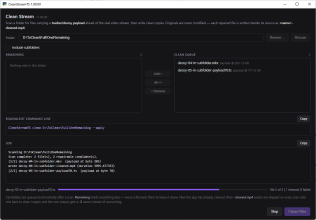
We wrote a small tool: CleanStreamTS (Windows, free, MIT license, single installer, 67MB ).

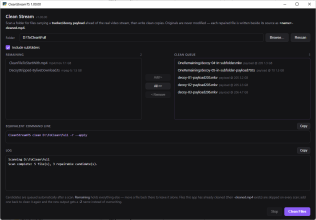
Point it at a folder. It scans, queues anything repairable automatically, and writes a clean copy beside each original as name-cleaned.mp4. Your originals are never touched. There is also a command line if you prefer.

Important: this is not a re-encode. The video was never damaged, so there is nothing to re-encode. The tool finds where the real stream begins, copies from there to the end, and rewraps it. No quality loss, and it runs at disk speed.
We verified this properly rather than eyeballing it. On a 1.3 GB file, the video bitstream MD5 before and after is identical, with the same frame counts (119742 video / 187288 audio) and the same duration to the microsecond. The only thing that changes is the container index, which also makes the result seek instantly instead of stalling.
Before and after, same file, same command:
It refuses to guess
Worth knowing, because it matters for trusting it with your collection. MPEG-TS packets begin with the byte 0x47 every 188 bytes, but a lone 0x47 turns up roughly once every 256 bytes of arbitrary data. The tool only accepts a payload when that byte recurs at eight consecutive 188-byte-aligned positions. If a file has a decoy prefix over something it does not recognise, it reports it and leaves it alone rather than writing a file from a guessed offset. Originals are never modified, and an existing output is never overwritten.
Leave the Trojans behind - not downloading them in the first place
If you use liveDownload, the current build strips the prefix from each segment as it downloads, so the output is clean and needs no repair at all. Verified the hard way: lada consumed a freshly downloaded 1.5 GB .ts straight from liveDownload — no repair step, no remux — and processed every frame:
Other downloaders concatenate the responses as-is and produce affected files — that is not really their fault, they are writing exactly what the server sent them.
Bug reports
If you hit a variant of this, the tool's scan output masks filenames automatically (first ten characters plus a hash), so it is safe to paste publicly. Please do not attach media. If a file comes back as decoy_prefixed_unknown_payload I would genuinely like to see the scan line — that means a variant I have not encountered.
If you have ever downloaded something, watched it play perfectly in PotPlayer, and then had it fail the moment you tried to do anything else with it — this is probably your problem. It took a while to track down and we have not seen a correct explanation anywhere, so here it is along with a fix.
The symptoms
They look unrelated, which is exactly why this has been so hard to search for. Depending on what you feed the file to, you get one of:
- lada (or anything OpenCV-based):
followed byCode:
global cap_ffmpeg_impl.hpp open Could not find decoder for codec_id=61Code:KeyError: 'duration' - Anything using NVDEC:
Code:
NvDecoder::NvDecoder : Error code : 300 ... cuvidCreateVideoParser(...) returned error 300 - ffprobe / ffplay: your 3 GB movie reported as
— a 1x1 imageCode:
Input #0, png_pipe
Three tools, three completely different errors, one cause. Nobody searching for one of these ever finds the others.
What is actually in the file
The video is fine. Nothing is corrupt and nothing is missing. There is simply a tiny image stuck to the front of it:
Code:
[ 70-byte PNG ][ ...the real MPEG-TS video stream... ]
  ^ byte 0       ^ the actual video starts here
That PNG is a 1x1 fully transparent pixel. It displays as nothing at all. It is not a broken thumbnail — it has no visual purpose whatsoever. That is the shape of a tracking beacon: something that exists to be requested, not to be seen.
Older files from early 2025 use a slightly bigger version — about 120 bytes plus 85 bytes of padding — so this has been going on for a while, and the exact size varies. I ran into these type of files as early as 2023, did not know this was the casue at that time.
Why it plays fine in some things and not others
VLC, PotPlayer and Windows Media Player scan forward looking for something they recognise, find the video stream, and play it without ever mentioning the junk at the front.
Stricter parsers trust byte 0. ffprobe matches the PNG signature and concludes the file is an image. NVIDIA's decoder is handed bytes that are not a video stream and gives up. OpenCV asks for a PNG decoder for what it believes is a picture, fails, and then crashes on a missing duration.
Here is the part that surprised me: We counted the PNG signatures in one 3.4 GB file and found 1188 of them. The image is attached to every single segment the CDN serves, not just the first one. The other 1187 are harmless — a transport-stream demuxer resynchronizes on the next sync byte and skips right over them. Only the copy that lands at byte 0 does any damage. That is the whole reason this went unexplained for years: the visible symptom is one byte offset, and the actual behavior is over a thousand.
The fix
We wrote a small tool: CleanStreamTS (Windows, free, MIT license, single installer, 67MB ).
Point it at a folder. It scans, queues anything repairable automatically, and writes a clean copy beside each original as name-cleaned.mp4. Your originals are never touched. There is also a command line if you prefer.
Important: this is not a re-encode. The video was never damaged, so there is nothing to re-encode. The tool finds where the real stream begins, copies from there to the end, and rewraps it. No quality loss, and it runs at disk speed.
We verified this properly rather than eyeballing it. On a 1.3 GB file, the video bitstream MD5 before and after is identical, with the same frame counts (119742 video / 187288 audio) and the same duration to the microsecond. The only thing that changes is the container index, which also makes the result seek instantly instead of stalling.
Before and after, same file, same command:
Code:
> lada-cli --input "original.mkv" ...
[ERROR] Could not find decoder for codec_id=61
KeyError: 'duration'

> lada-cli --input "cleaned.mp4" ...
Processing video: 100%|████████████| Processed: 59:21 (119742f) | Speed: 47.9fps
It refuses to guess
Worth knowing, because it matters for trusting it with your collection. MPEG-TS packets begin with the byte 0x47 every 188 bytes, but a lone 0x47 turns up roughly once every 256 bytes of arbitrary data. The tool only accepts a payload when that byte recurs at eight consecutive 188-byte-aligned positions. If a file has a decoy prefix over something it does not recognise, it reports it and leaves it alone rather than writing a file from a guessed offset. Originals are never modified, and an existing output is never overwritten.
Leave the Trojans behind - not downloading them in the first place
If you use liveDownload, the current build strips the prefix from each segment as it downloads, so the output is clean and needs no repair at all. Verified the hard way: lada consumed a freshly downloaded 1.5 GB .ts straight from liveDownload — no repair step, no remux — and processed every frame:
Code:
> lada-cli --input "DecoyStripped-ByliveDownload.ts" ...
Processing video: 100%|██████████| Processed: 1:02:48 (119742f) | Speed: 42.9fpsBug reports
If you hit a variant of this, the tool's scan output masks filenames automatically (first ten characters plus a hash), so it is safe to paste publicly. Please do not attach media. If a file comes back as decoy_prefixed_unknown_payload I would genuinely like to see the scan line — that means a variant I have not encountered.