DE-censoring JAV with Free Open source LADA application

Could you tell me how to setup two env vars?
View attachment 3779228
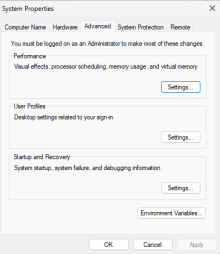
On windows, windows key->search "edit the system environment variables"->1771883147666.png->click "environment variables" on the bottom from Advance tab->1771883225571.png->click "new" then add the variables "TVAI_MODEL_DATA_DIR" and "TVAI_MODEL_DIR" and point to the"models" folder of Topaz in the ProgramData directory.
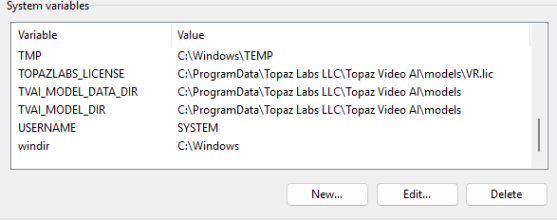
 
On windows, windows key->search "edit the system environment variables"->View attachment 3779593->click "environment variables" on the bottom from Advance tab->View attachment 3779594->click "new" then add the variables "TVAI_MODEL_DATA_DIR" and "TVAI_MODEL_DIR" and point to the"models" folder of Topaz in the ProgramData directory.
Thanks, I got it to work but a 30 minute video takes me 7 hours, don't know if that normal or not
 
Thanks, I got it to work but a 30 minute video takes me 7 hours, don't know if that normal or not
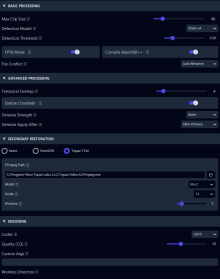
It depends on what gpu you're using it with. I've notice that jasna maxes out the gpu usage up 96-98%. I don't think thats normal tbh, have you tried it without using TVAI? I get decient results with Max clip size to 40 and Temporal Overlap at 4. If your settings are too high for your system to handle that could be why it takes that long.
 
does this app (or the previous ones) skip the parts of the video without any mosaic? that should speed up things a lot right if they do.
has anyone used this with an Intel Arc GPU? I cant afford an Nvidia GPU.
 
does this app (or the previous ones) skip the parts of the video without any mosaic? that should speed up things a lot right if they do.
has anyone used this with an Intel Arc GPU? I cant afford an Nvidia GPU.
At the moment Jansa doesn't support Intel GPU's it only supports 20 series and above. Lada is the one that supports intel GPUs. In theory yes, but i think it still tries to look for mosaic to filter.
 
It depends on what gpu you're using it with. I've notice that jasna maxes out the gpu usage up 96-98%. I don't think thats normal tbh, have you tried it without using TVAI? I get decient results with Max clip size to 40 and Temporal Overlap at 4. If your settings are too high for your system to handle that could be why it takes that long.
works fine without TVAI, only took about 20 minutes. Wondering if i need to adjust settings for TVAI or other things. Could you tell me the settings you have changed and their values.
 
how do you guy add additional detection model ?? I downloaded the VR-V2 model, put it in the model_weight folder but lada is not picking up, what are the steps I need to take? I'm running the standalone GUI windows version. Thank you in advance.
 
Last edited:
Hi guys, wanna asking few questions since i am new into this things. I've tried decensoring using Jasna Yesterday, but the results are odds. Videos are bit stuttering, and also for few mosaic removal there are black squares (not all of the frame, but a few frame). Could you tell me what is wrong with my setup? i am using RTX 5050, Ryzen 7 3700x with 16gb ram. But when i am using LADA it looks better and smooth.
 
Hi guys, wanna asking few questions since i am new into this things. I've tried decensoring using Jasna Yesterday, but the results are odds. Videos are bit stuttering, and also for few mosaic removal there are black squares (not all of the frame, but a few frame). Could you tell me what is wrong with my setup? i am using RTX 5050, Ryzen 7 3700x with 16gb ram. But when i am using LADA it looks better and smooth.
I think the black squares are because you have HAGS on, someone had same issue on another thread.
 
This development is very exciting but unfortunately it looks way to complicated for the simple computer knowledge I have. Can we assume that at some point a suitable software for dummies will be created that will do this work. I've always found that reasonably priced payware works for most things.

Two thoughts that might speed things up for current users:

1. If you took an already reduced mosaic film and applied these programmes would the process be quicker (and perhaps produce even better results then the remarkably good images shown on here) as more information is already on the film so less AI learning is required?

2. If you remove the relevant segments of film that need mosaic removal, process them and add it back to the original film, would that also not speed things up compared with processsing the whole film?
 
This development is very exciting but unfortunately it looks way to complicated for the simple computer knowledge I have. Can we assume that at some point a suitable software for dummies will be created that will do this work. I've always found that reasonably priced payware works for most things.

Two thoughts that might speed things up for current users:

1. If you took an already reduced mosaic film and applied these programmes would the process be quicker (and perhaps produce even better results then the remarkably good images shown on here) as more information is already on the film so less AI learning is required?

2. If you remove the relevant segments of film that need mosaic removal, process them and add it back to the original film, would that also not speed things up compared with processsing the whole film?
The Mac version LadaMac is a fork of a slightly older version of the current LADA-I believe they built a custom GUI, bundled it as an app, and made it available as a free download as a simple Mac app. You just download, release permissions (a Mac thing), run it, drag files to it, and it starts the magic. It's about as 'software for dummies' as it gets, lol, which is good for me. I'm pretty sure the LADA team are working on making the final versions with GUIs, easy installs, etc. for PC and Linux (and Mac, I hope)

The problem I see with the 1st point is you are already working on a lossy version of the original file, so anything you do makes the overall quality worse when you resave it with the new changes. To me, this is the real potential of LADA-a lot of the reduced mosaic versions out there are not only worse quality because of JAVPlayer, but are also reuploaded to streaming sites where they may have reduced the quality even more for streaming. Being able to use a higher quality original and doing it in-house seems to give overall better quality in my eyes. What is also interesting is I believe for the past several months a lot of the reduced mosaic videos on streaming sites *are* using LADA, as I'm not seeing the JAVPlayer logo or floating watermarks on recent MRs.

Your 2nd point is something they have been discussing on the codeberg/github of LADA-one idea is to just identify points of the video/specific areas to be processed I think.
 
  • Like
Reactions: Scheer
Not sure if 1 is possible. If most of the mosaic is already removed, I don't know whether the software can recognise which area to work on. It is already missing some censored spots on my attempts because it didn't notice the mosaic.
 
  • Like
Reactions: Scheer
Same. If you already did run the video through an older lada version there is no real benefit to run the encoded video through an newer version of lada again. Just run the original file/video through the newest available version of lada. Reasons: 1. newer version of lada= probably newer mosaic detection and restoration model which bring better restoration of private parts and less undetected mosaics,
2. video files would be encoded two times (reduces quality).

If you run an older de-mosaiced video through lada again, you may catch non picked up mosaics but the restoration (for the detected mosaics) of the private parts was already done with the older versin of lada (probably an older model).
 
Last edited:
  • Like
Reactions: Scheer
Hi guys, anyone can explain the difference between Iris-2, Iris-3 etc on Topaz TVAI model? and if anyone could send the comparation picture or gif it would be a huge information for us. Since i search on internet and no one talks about it.
 
Last edited:
Hi guys, anyone can explain the difference between Iris-2, Iris-3 etc on Topaz TVAI model? and if anyone could send the comparation picture or gif it would be a huge information for us. Since i search on internet and no one talks about it.
Hi,

Iris-1, Iris-2, Iris-3 are simply different generations of the Iris AI model. Each newer number means the model was re-trained and improved, not just a setting change.

Iris-1​

First version of the model
Focused on face enhancement in degraded footage
Sometimes over-smoothed details or produced unnatural textures

Typical use:

Old DVDs
VHS transfers
Low-resolution web video

Iris-2​


Major update to Iris-1.

Improvements:

Better detail reconstruction
Less plastic-looking skin
Better noise and compression cleanup
Improved temporal consistency (less flicker between frames)

Typical use:

480p–1080p compressed footage
DVD or early digital camera footage

Iris-3​

Improvements:

More accurate AI face reconstruction
Better balance between detail and smoothing
Less artifacting on edges and textures
Improved results on modern HD footage

Typical use:

YouTube downloads
HD camcorder video
Upscaling 720p/1080p → 4K

-Besh