

DE-censoring JAV with Free Open source LADA application

Hello guys,
I'm looking for a "decensoring" expert I could interview for the blog section of AVSubtitles.com
The goal is not to teach "decensoring" (or whatever it is called, sorry, I don't know the words). The goal is to show your work, how it looks, how much time it takes, your technical background, etc. If you do this for many years, it will be interesting to know how it evolves.
Interviews are text only. About 10 short questions I'll send by email.
You can remain anonymous, or I can promote your links (only legal, no piracy), it's up to you. Unfortunately I have no budget :( so sharing your work/links is the only thing I can do.

If you are interested, the simplest way is to send me a PM.
Thank you!
 
So far I've only seen people talking about using this on pretty high res videos, but I was curious how well it would handle my older videos.

I tried running lada on my 640x480 AVI copy of IESP-348. Because it's an AVI file I couldn't use any of the nvidia hardware encoders but had to use he AV1 software encoder. I thought it'd take ages but due to the low resolution it was actually pretty fast. It needed about 30 minutes to do a 90 minute movie.

Probably due to the original file not being very sharp it did have some issues detecting what parts were censored, especially if the the people were close together and the mosaic area was pretty small but overall, I was pleasantly surprised.

Not sure if I should use different settings to make it miss fewer mosaiced spots, I used the same settings people used for the more modern files, aside from the encoder bit of course. Already used the v4-accurate mosaic detection model instead of the v4-fast one.

image.jpgimage.jpg
 
So far I've only seen people talking about using this on pretty high res videos, but I was curious how well it would handle my older videos.

I tried running lada on my 640x480 AVI copy of IESP-348. Because it's an AVI file I couldn't use any of the nvidia hardware encoders but had to use he AV1 software encoder. I thought it'd take ages but due to the low resolution it was actually pretty fast. It needed about 30 minutes to do a 90 minute movie.

Probably due to the original file not being very sharp it did have some issues detecting what parts were censored, especially if the the people were close together and the mosaic area was pretty small but overall, I was pleasantly surprised.

Not sure if I should use different settings to make it miss fewer mosaiced spots, I used the same settings people used for the more modern files, aside from the encoder bit of course. Already used the v4-accurate mosaic detection model instead of the v4-fast one.
 
Hello guys,
I'm looking for a "decensoring" expert I could interview for the blog section of AVSubtitles.com
The goal is not to teach "decensoring" (or whatever it is called, sorry, I don't know the words). The goal is to show your work, how it looks, how much time it takes, your technical background, etc. If you do this for many years, it will be interesting to know how it evolves.
Interviews are text only. About 10 short questions I'll send by email.
You can remain anonymous, or I can promote your links (only legal, no piracy), it's up to you. Unfortunately I have no budget :( so sharing your work/links is the only thing I can do.

If you are interested, the simplest way is to send me a PM.
Thank you!
An interview with the dev of lada would be cool. Why he started the project, current state, technical details, future development.
You can find him https://github.com/ladaapp/lada or https://codeberg.org/ladaapp/lada or on the Discord.
Also some question regarding AVSubtitles.com. Do you offer an api? Would be cool to see lada having access to AVSubtitles.com api to grab subs for the current movie or to develop an mpv player plugin.

@Electromog did you try to upscale the video with an upscaler software like Topaz or what Not2srius suggested before using Lada?
 
I've tried this on a Mac (M4 with 36 gb RAM) and it's pretty good. I've experimented with the light-medium-heavy sharpness settings and generally just leave it at light. I've been doing mp4 vids on the hevc_videotoolbox codec with good results. Avi did not work until I chanced the codec to h264 - it worked but the results were only ok. It was a lower res video though, maybe that's a factor here. I'd like to get Lada to work on an Intel mac and just leave it batch processing unattended, but the app only seems to run on Silicon. Is anyone else trying this on a mac? What do you guys use for settings?
 
Electromog did you try to upscale the video with an upscaler software like Topaz or what Not2srius suggested before using Lada?
I don't have upscaling software. Is there any that is free and still gets good results? As far as I can tell from the site the free version of videoproc only does 5 minute videos or shorter.
 
I don't have upscaling software. Is there any that is free and still gets good results? As far as I can tell from the site the free version of videoproc only does 5 minute videos or shorter.
I don't know. I use a cracked version from rutracker. You can try the free upscalers from some github repos but I don't know if any of them are good.
 
I've tried this on a Mac (M4 with 36 gb RAM) and it's pretty good. I've experimented with the light-medium-heavy sharpness settings and generally just leave it at light. I've been doing mp4 vids on the hevc_videotoolbox codec with good results. Avi did not work until I chanced the codec to h264 - it worked but the results were only ok. It was a lower res video though, maybe that's a factor here. I'd like to get Lada to work on an Intel mac and just leave it batch processing unattended, but the app only seems to run on Silicon. Is anyone else trying this on a mac? What do you guys use for settings?
Are you using LadaMac? (linked above)
 
1 day 480 to 1080 and 3 days from 1080 o 4k
wow that's insane. Thanks for the screens.
You were referring to a thread where a guy there said he was getting speeds of ~1.1x on an rtx3060. I thought you were able to replicate those results. I wonder if it's a reliable comment though, and if it is, what kind of magical recipe he used to acheive that kinda perf...
 
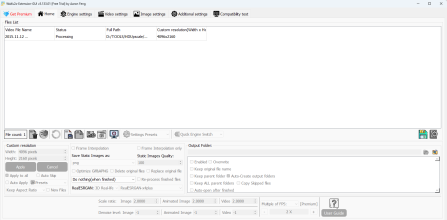
Noticed this just came out https://github.com/AaronFeng753/Waifu2x-Extension-GUI/releases/v3.134.01

Change log | 更新日志:​

- Updated Waifu2x-NCNN-Vulkan Engine, overall 22% faster than previous version.<br>- Improved subtitle processing logic, now supports a wider range of subtitle formats.<br><br>- 更新了 Waifu2x-NCNN-Vulkan 引擎,整体速度比上一版本快 22%。<br>- 改进了字幕处理逻辑,现已支持更广泛的字幕格式。
 
So more Vram + newer gen GPU = better decen-quality?
The quality you get depends on your settings. Your hardware profile will affect the time it takes with those settings. The post ur referring to was a comp between jasna and lada on the same platform, and on my end, lada seems to do better with the settings I used.

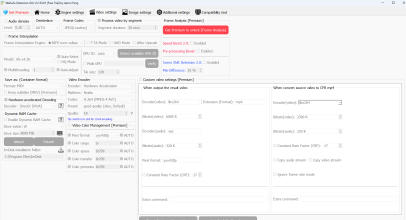
this is what I used. I'm getting ETAs of >8h for a 2h 720p->1080p movie vs 6h with video proc. In any case, nowhere near the 1.1x speed the guy talked about.
 
  • Like
Reactions: mycl500
The quality you get depends on your settings. Your hardware profile will affect the time it takes with those settings. The post ur referring to was a comp between jasna and lada on the same platform, and on my end, lada seems to do better with the settings I used.


this is what I used. I'm getting ETAs of >8h for a 2h 720p->1080p movie vs 6h with video proc. In any case, nowhere near the 1.1x speed the guy talked about.
How's the quality of Waifu2x-Extension-GUI v3.134.01 vs video proc?