

Hope you post these.I just de-censored some old Reiko Nakamori and Anna Ohura Movies. Even the old Anna movies look great
Thanks and Have Fun!



Hope you post these.I just de-censored some old Reiko Nakamori and Anna Ohura Movies. Even the old Anna movies look great

My suggestion is using NVIDIA newest graphic card. I am also using RTX 5050. Budget-wise it is okay to go, also by my experience in this 2 months it has another advance restoration quality rather than its older version (i am comparing into another user from another forum quality). I think it has its own plus point where it is using Blackwell Architecture (designed for RTX 50 series card, claims it is faster, smarter etc). Yes, it has very strict limitations. Which is the VRAM. But, you can experiment with the setting as long as you won't restorating 4k JAV video (i think it would be too much for the graphic card). And when you said the older JAV movie, i am suggesting use ISO file which is its original file. Convert it using losslesscut, or shutterencoder, so you could maintain the original quality. Because, the main key is the original files. Not only the graphic card. When you could meets their 2 requirements, i think you find the sweet spots. Everything based on my experience. So, please correct me if i am wrong.How is performance with Intel arc cards? Nvidia gpu is too expensive, so I'm considering an Arc a310 or 380. how do they compare to an Nvida?
also what is the result with the older heavily pixelated videos eg you can find on highporn? they are not in 1080p in fact many are 480p. does it do an ok job?
thank you. since I am new to all this, I have a few questions -My suggestion is using NVIDIA newest graphic card. I am also using RTX 5050. Budget-wise it is okay to go, also by my experience in this 2 months it has another advance restoration quality rather than its older version (i am comparing into another user from another forum quality). I think it has its own plus point where it is using Blackwell Architecture (designed for RTX 50 series card, claims it is faster, smarter etc). Yes, it has very strict limitations. Which is the VRAM. But, you can experiment with the setting as long as you won't restorating 4k JAV video (i think it would be too much for the graphic card). And when you said the older JAV movie, i am suggesting use ISO file which is its original file. Convert it using losslesscut, or shutterencoder, so you could maintain the original quality. Because, the main key is the original files. Not only the graphic card. When you could meets their 2 requirements, i think you find the sweet spots. Everything based on my experience. So, please correct me if i am wrong.
1. I prefer jasna over Lada. I think in my opinion it depends on your settings on jasna. If you don't using Secondary Restoration, such as Topaz Video AI, RTX Resolution or else it is could be faster. But again, it depends on your settings. Since for me, the reason i am using Jasna is because there is so many tweaking i could try on with. And experimenting with it. But, if you want simple use, and fast too, you could go with Lada.thank you. since I am new to all this, I have a few questions -
- which program do you use - lada or jasna (they are the 2 I read about), the jasna oage claims its 2-3x faster, is that true?
- how many video can you convert at once, and on which nvidia card? eg if I get older 3060 vs 5050
- I dont have original files in iso. only downloads

I prefer Jasna too for its speed and good decensoring. However, the annoying part is that the output video has a different color tone compared to the original— it's 'colder'. Anyone knows a fix for this?1. I prefer jasna over Lada. I think in my opinion it depends on your settings on jasna. If you don't using Secondary Restoration, such as Topaz Video AI, RTX Resolution or else it is could be faster. But again, it depends on your settings. Since for me, the reason i am using Jasna is because there is so many tweaking i could try on with. And experimenting with it. But, if you want simple use, and fast too, you could go with Lada.
2. As far as i go, i am render max 3 videos (2hrs Estimated per video). And i am too afraid to overuse the graphic card, since i have bad experience with fried graphic cards :
3. I mean, if you okay with it just go for it. My suggestion is if you want to after quality decensoring. Because the final results are depends on your source file. For example, if you are downloading the video with low bitrate and quality, and you decensoring it, i think it would be messed up. But some people are okay with it and i couldn't against it. Again, it is how you want to enjoying it.
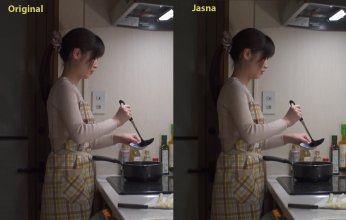
The updated version (0.6.2) has the solved for your problems. I guess it much faster too. You should check it out.I prefer Jasna too for its speed and good decensoring. However, the annoying part is that the output video has a different color tone compared to the original— it's 'colder'. Anyone knows a fix for this?
View attachment 3815708
maybe I'm blind but I don't see any color differenceI prefer Jasna too for its speed and good decensoring. However, the annoying part is that the output video has a different color tone compared to the original— it's 'colder'. Anyone knows a fix for this?
View attachment 3815708

Jasna work well with older movie if your source video are proper too. I mean, the real source video. Just like .AVI, or .MKV or even .WMV are work really well. I prefer use third application such as MakeMKV for convert video from ISO file. So it would contain decent quality from the video. You can see the quality from the video using MediaInfo software for more detailed information. Also, if you want to take the decensored into higher level, you should learn how to interlacing or something like that. Because some of the video contain Variable Frame Rate (VFR) which could causing a bit annoying glitchy effect when you use decensoring JASNA. It sounds complicated, but i can guarantee, you will really satisfied with the final quality.maybe I'm blind but I don't see any color difference
so general qn - are the decensored releases made using these 2 apps or do they use something else, and can we get similar results?
how well does it work for the older jav which has much more pixelation. that was the golden age of jav.
I found out the cause is my MPC-BE displaying incorrect colors on 10-bit video, not because of Jasnamaybe I'm blind but I don't see any color difference
so general qn - are the decensored releases made using these 2 apps or do they use something else, and can we get similar results?
how well does it work for the older jav which has much more pixelation. that was the golden age of jav.
I'm not familiar with Github but I see what you mean. I posted a request on the 'Issues' tab. Thank you.I didn't buy the model but I went to github page and I see at least three different ways to contact the author (besides Discord)