

i need some help. i have problem adding GHKR-24 to the collection, i tried scanning multiple time still not shown in the collection. i try putting it in a folder and still not detected by javluv. i tried add the metadata manually and still the same.
JavLuv JAV Browser
- Thread starter TmpGuy
- Start date
-
Akiba-Online is sponsored by FileJoker.
FileJoker is a required filehost for all new posts and content replies in the Direct Downloads subforums.
Failure to include FileJoker links for Direct Download posts will result in deletion of your posts or worse.
For more information see this thread.

You are using an out of date browser. It may not display this or other websites correctly.
You should upgrade or use an alternative browser.
You should upgrade or use an alternative browser.

That worked well and I was surprised it didn't take too long. Very clean now. Lost 2000 movies!Thanks, Will try that

Great that it worked, Sad about the 2000 vids. I won't share my own horror story but it sucks, at least that's one problem solved though. Cheers.That worked well and I was surprised it didn't take too long. Very clean now. Lost 2000 movies!

Theres a simpler solution that wont lose you your data incase you redownload those files. [NOTE: I only read the beginning of your post and realised you posed the exact same thing firstI realize that you asked TmpGuy and he probably has a better idea than I do. But I've been down this exact road where a full 24TB drive died. What I ended up doing was deleting the entire Javluv folder, in C:... but here's something you can try before you go through that time-consuming process. You could Open Javluv, select all of your videos, (select one and then do Ctrl-A to select them all, then with your cursor over one of them, right click and choose "rescan files" not "regenerate metada" that will take a litte while for the program to run through all of your files and it should eliminate all files that are defunct without going through the time-consuming process of "regenerate metadata" or just reloading from scratch. Try the "rescan files" option first and if that fails,, perhaps TmpGuy has a better solution than I have offered. Good luck.
 ]
]Just highlight all files in your library with CTRL-A and then Rescan. All missing files will be removed but that data will remain in-case you every download them again.
Edit: Regards failures.
Yeah it sucks that have such a failure and I have 16TB drives but I have everything backed up and then again all my favourites onto a totally offline drive. I've been at this for over 18 years so I would be most upset as a lot or irreplaceable.
Worse I ever had was a 2TB seagate drive that failed after 5 years but it was fully backed up.
Last edited:

Well, to start with, you say you want to delete.. "other than cover art and metadata" I am assuming that you already know where those files are. Your original statement "how to uninstall javluv browser? other than cover art and metadata," could mean that you already know where the cover art and metada is or it could mean that you don't want to delete that information. IF you are in any way unclear about what I have said, don't follow my advice. Wait for TmpGuy to address it because I'm going on the assumption that you mean you want to get rid of everything and not that you want to retain the cover art and metadata for some other purpose.how to uninstall javluv browser? other than cover art and metadata, is there any folder hiden in the system i need to delete?
In Windows 11, Go to C:\Users\USER\AppData\Local\JavLuv (this is where the cover art/metadata is stored) in my chain the second folder in the chain USER is my computer name, you may have named it somethng else so under the Users directory look for a folder with your computer name and then follow the string to the javluv folder, just manually delete the folder (doing so will delete your actress data and cover thumbnails.
You should have one other folder called Javluv wherever you originally installed the program. Typically on C but it could be Anywhere. If you have shortcut to the program, right click on it and choose, Open file location, that will take you to the actual folder where the shortcut exists, then right click on that icon and again click 'Open file location" this will take you to the actual install location. Click the up arrow in this window to go to the parent directory for this program. Then you can see where the program files exist. Just delete that javluv folder. That should do it.
Last point. Your original statement "how to uninstall javluv browser? other than cover art and metadata," could mean that you already know where the cover art and metada is or it could mean that you don't want to delete that information. IF you are in any way unclear about what I have said, don't follow my advice. Wait for TmpGuy to address it because I'm going on the assumption that you mean you want to get rid of everything and not retain the cover art and metadata for some other purpose.
ahh sorry with my confusing question. i said it because i know how to delete the metadata and cover art since its in the same folder as the video. same thing with the software it self. i just want to know is there any data left that i need to delete. ok so its in user folder thanksWell, to start with, you say you want to delete.. "other than cover art and metadata" I am assuming that you already know where those files are. Your original statement "how to uninstall javluv browser? other than cover art and metadata," could mean that you already know where the cover art and metada is or it could mean that you don't want to delete that information. IF you are in any way unclear about what I have said, don't follow my advice. Wait for TmpGuy to address it because I'm going on the assumption that you mean you want to get rid of everything and not that you want to retain the cover art and metadata for some other purpose.
In Windows 11, Go to C:\Users\USER\AppData\Local\JavLuv (this is where the cover art/metadata is stored) in my chain the second folder in the chain USER is my computer name, you may have named it somethng else so under the Users directory look for a folder with your computer name and then follow the string to the javluv folder, just manually delete the folder (doing so will delete your actress data and cover thumbnails.
You should have one other folder called Javluv wherever you originally installed the program. Typically on C but it could be Anywhere. If you have shortcut to the program, right click on it and choose, Open file location, that will take you to the actual folder where the shortcut exists, then right click on that icon and again click 'Open file location" this will take you to the actual install location. Click the up arrow in this window to go to the parent directory for this program. Then you can see where the program files exist. Just delete that javluv folder. That should do it.
Last point. Your original statement "how to uninstall javluv browser? other than cover art and metadata," could mean that you already know where the cover art and metada is or it could mean that you don't want to delete that information. IF you are in any way unclear about what I have said, don't follow my advice. Wait for TmpGuy to address it because I'm going on the assumption that you mean you want to get rid of everything and not retain the cover art and metadata for some other purpose.
Cheers. Something that I failed to note is that in my chain there is a folder called AppData, IT is hidden by default so if you don't see it go up to view/show/ and click the hidden items option. YOu may have to reload the folder for the app data folder to show.ahh sorry with my confusing question. i said it because i know how to delete the metadata and cover art since its in the same folder as the video. same thing with the software it self. i just want to know is there any data left that i need to delete. ok so its in user folder thanks
Last edited:
What you do it type: %appdata% into the start bar and open the folder it leads to. Now press the Up arrow on the folder to go up one level and go into LOCAL folder. Be careful and do not delete anything other than the folder called: JavLuv and that will get rid of all hidden files. Mines over 20GBCheers. Something that I failed to note is that in my chain there is a folder called AppData, IT is hidden by default so if you don't see it go up to view/show/ and click the hidden items option. YOu may have to reload the folder for the app data folder to show.
Thanks moxy. I "assumed" that he knew that was part of the original adddress but your your point is right. You can never be too careful. thank you for mentioning that.What you do it type: %appdata% into the start bar and open the folder it leads to. Now press the Up arrow on the folder to go up one level and go into LOCAL folder. Be careful and do not delete anything other than the folder called: JavLuv and that will get rid of all hidden files. Mines over 20GB
Thank you so much for this wonderful tool. Will there ever be a linux port?JavLuv for Windows is a handy browser for finding and displaying all your JAV movies. Using the DVD-ID embedded in your folders or filenames, it downloads metadata from online databases and writes them to local .nfo files. You can browse and search for movies by keywords, categories, actress names, folders, etc and sort by various criteria.
Installing JavLuv couldn't be easier. Just download the Setup executable, install it, and you're done. Then, scan your movies, and the rest is automatic. You can even have JavLuv organize and rename all your movies into nearly whatever sort of organizational structure and naming scheme using movie metadata.
View attachment 3031908
JavLuv Browser View
View attachment 3031909
JavLuv Detail View
JavLuv Features
- Browse collections in a traditional thumbnail / details view, and launch movies
- Automatically scan movies, scrape metadata from a few well-known websites, and download covers if needed
- Stores metadata in Kodi/Javinizer compatible .nfo files next to the movie
- Sort and browse movies by title, ID, actress, newest / oldest release date, or user rating.
- Search / filter collection by title, names, keywords, IDs, studio, label, or folders using a search bar
- Automatic renaming and organizing of collection into nearly any folder and file structure
- Built-in utility to concatenate movies losslessly
- User-definable filters for genre tags, actress, studio, label, and director.
- And more...
The latest updates are available on GitHub:

Releases · JavLuv/JavLuv
Your JAV Movie Organizer. Contribute to JavLuv/JavLuv development by creating an account on GitHub.github.com
It Does, Most are Webp by default if you look at the cover pixWhy doesn't the browser display webp covers?
Had an issue last week (don't update drivers from third-party sources, lesson learned) and had to reinstall Windows 11 and my necessary software, including JavLuv. I believe I downloaded the most recent version, 1.2.10 correct? I notice that when I right click on a movie, I don't have the option to import cover art anymore. Is there another way to do so?
Thanks again for creating such a great product. I can't imagine curating my collection without it.
Thanks again for creating such a great product. I can't imagine curating my collection without it.
1.2.10 is correct. It's been a while since he updated. As for cover importing I am not clear about what specifically you mean, for instance if a movie got registered into Javluv but has no cover image you can right click on the thumbnail version where there should be a cover, right click and choose import cover. You will need to have a cover file somewhere on your pc to import but once it's been imported into javluv you don't need to keep it. That said I feel like your problem is something else and I'm not picking up what you're putting down. If you want to give me some more details of what your problem is I will try to help you to figure it out.Had an issue last week (don't update drivers from third-party sources, lesson learned) and had to reinstall Windows 11 and my necessary software, including JavLuv. I believe I downloaded the most recent version, 1.2.10 correct? I notice that when I right click on a movie, I don't have the option to import cover art anymore. Is there another way to do so?
Thanks again for creating such a great product. I can't imagine curating my collection without it.
I used to have that option to import cover. This is what I have now.1.2.10 is correct. It's been a while since he updated. As for cover importing I am not clear about what specifically you mean, for instance if a movie got registered into Javluv but has no cover image you can right click on the thumbnail version where there should be a cover, right click and choose import cover. You will need to have a cover file somewhere on your pc to import but once it's been imported into javluv you don't need to keep it. That said I feel like your problem is something else and I'm not picking up what you're putting down. If you want to give me some more details of what your problem is I will try to help you to figure it out.
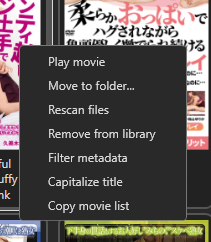
I used to have that option to import cover. This is what I have now.View attachment 3827529
Go to settings/Show advanced options and it should show you that bottom half of the menu
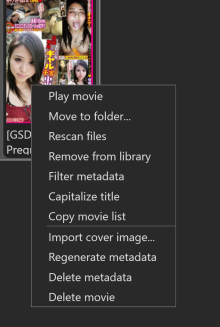

.webp files load fine on my install. I checked your files that are not showing covers and none of them are listed on javlibrary. They are probably not registering when you scan them, What you will have to do for these files (It is not the .webp issue) is download the correct covers and then right click on these icons individually and import the correct cover image into javluv. Make sure in settings you have "show advanced options" clicked to get the option to import images. PS. an easy way to find the cover images is type in your code + jav, in your search bar, then enter, then select images near the top of the page, usually the first image is the one you're looking for. Click that, a broader detail will come up , right click and click load image in new tab, then download that full image. Hopefully you don't have too many files to manually enter the cover data. Cheers.Some covers aren't displaying because they are in .webp format; how can I get them to show up?
View attachment 3831740
Unfortunately, that’s not the case. It is specifically the WebP files that aren't displaying. Could my system be missing something? I could convert everything to JPG, but I can't figure out why I'm the one having this problem. I'm running a Windows build from 2023..webp files load fine on my install. I checked your files that are not showing covers and none of them are listed on javlibrary. They are probably not registering when you scan them, What you will have to do for these files (It is not the .webp issue) is download the correct covers and then right click on these icons individually and import the correct cover image into javluv. Make sure in settings you have "show advanced options" clicked to get the option to import images. PS. an easy way to find the cover images is type in your code + jav, in your search bar, then enter, then select images near the top of the page, usually the first image is the one you're looking for. Click that, a broader detail will come up , right click and click load image in new tab, then download that full image. Hopefully you don't have too many files to manually enter the cover data. Cheers.
Similar threads
- Replies
- 30
- Views
- 84K
- Replies
- 0
- Views
- 5K
- Replies
- 8
- Views
- 2K

- Replies
- 1
- Views
- 920


- Replies
- 13
- Views
- 5K